
Independent insights, hands‑on testing, and side‑by‑side comparisons of Magento 2 extensions.

Popular articles


Boosting your online sales requires more than just driving traffic to your store; it requires turning those visitors into paying customers. This process, known as Magento conversion rate optimization (CRO), focuses on fine-tuning every element of your Adobe Commerce or Magento site to remove barriers to purchase.
Because Magento is a highly flexible platform, it offers incredible opportunities for customization. However, that same complexity can sometimes lead to performance issues or cluttered interfaces if not managed carefully.
Magento conversion rate optimization strategies
Conversion rate optimization for Magento is the systematic process of increasing the percentage of website visitors who take a specific action, such as making a purchase, signing up for a newsletter, or adding an item to a wish list.
Unlike simpler platforms, Magento’s architecture allows for deep integrations with ERPs, complex product configurations, and multi-store setups. CRO in this context means ensuring that these powerful backend features do not create a complicated frontend experience for the user.
Key conversion metrics that matter beyond conversion rate
While the overall conversion rate is your primary KPI, looking at it in isolation can be misleading. To get a full picture of your store’s health, you must track:
- Add-to-cart rate: Shows if your product pages are persuasive enough.
- Cart abandonment rate: Highlights potential issues with shipping costs or trust.
- Checkout completion rate: Specifically measures the efficiency of your Magento checkout optimization efforts.
- Average order value (AOV): Indicates if your upselling and cross-selling strategies are working.
- Customer lifetime value (CLV): Measures long-term loyalty beyond the first transaction.
Understand user behavior before optimizing
Before changing a single button color, you need to know why users are leaving. Data-driven optimization is far more effective than guessing.
Identifying friction points in the Magento buying journey
Friction is anything that prevents a user from moving to the next step. In Magento, common friction points include slow-loading category pages, confusing navigation menus, or a lack of clear shipping information. Use tools like heatmaps to see where users are clicking and where they are getting stuck. If users are repeatedly clicking on an unlinked image, they expect more information there.
Using analytics and session data to spot drop-off points
Google Analytics 4 (GA4) provides essential data on your conversion funnel. Look for "leaks" in your funnel. If 70% of users drop off between the cart and the checkout, your checkout process likely has too many fields or technical errors.
Session recordings can be eye-opening; watching a real user struggle to find the "Checkout" button on a mobile device provides more clarity than any spreadsheet could.
Common behavioral patterns in low-converting Magento stores
Low-converting stores often share similar patterns:
- Pogo-sticking: Users click a product, immediately go back to the list, and repeat. This suggests your product thumbnails or titles aren't providing enough information.
- Search abandonment: Users search for a term and leave. This indicates your internal search engine isn't returning relevant results.
- Rage clicking: Users click a button multiple times rapidly, usually because the site is slow to respond.
Optimize site speed and technical performance
Speed is the foundation of CRO. If your site is slow, users will leave before they even see your products.
Why performance directly impacts Magento conversion rates
Studies consistently show that every one-second delay in page load time can result in a significant drop in conversions. For Magento stores, which often handle large catalogs, performance is even more critical. A fast site feels trustworthy and professional. A slow site feels broken and insecure.
Core Web Vitals considerations for Magento
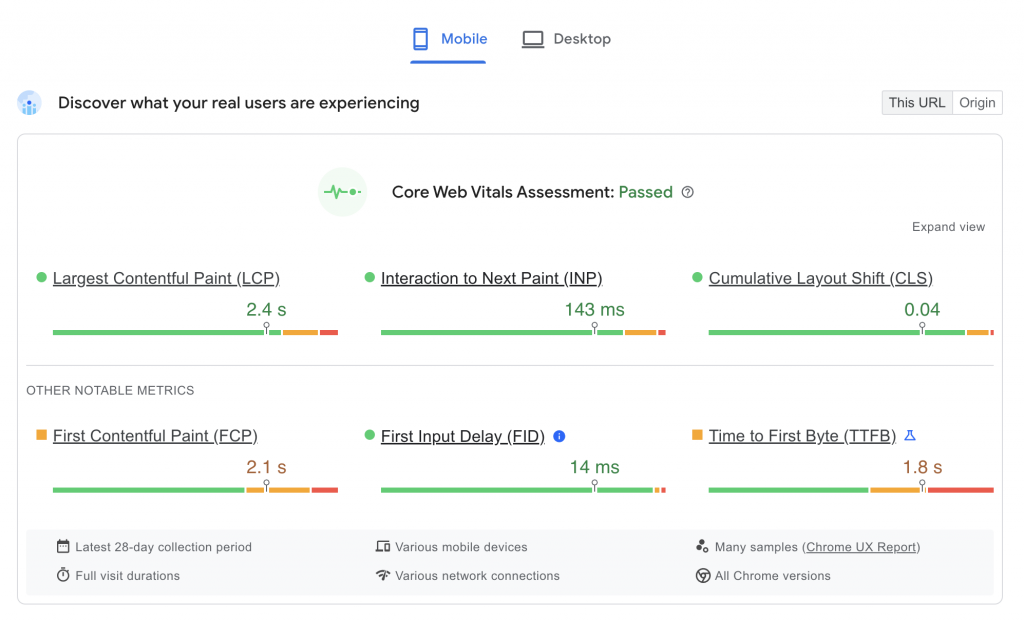
Google’s Core Web Vitals (Largest Contentful Paint, First Input Delay, and Cumulative Layout Shift) are now standard benchmarks for user experience.
- LCP: Ensure your main product image loads quickly.
- FID: Minimize heavy JavaScript so the page is interactive immediately.
- CLS: Prevent elements from jumping around while the page loads, which is a common issue with Magento banners and sliders.
Common Magento performance bottlenecks that reduce conversions
Magento is resource-intensive. Common bottlenecks include:
- Unoptimized images: Large files that haven't been compressed or converted to WebP.
- Excessive extensions: Each extension adds code that must be processed.
- Poor hosting: Using shared hosting for a high-traffic Magento store is a recipe for failure.
- Lack of caching: Failing to properly configure Varnish or Redis.
Improve product page clarity and persuasion
Your Product Detail Page (PDP) is your digital salesperson. It must answer every question a customer might have.
Optimizing product information hierarchy
Don't overwhelm users with a wall of text. Use a clear hierarchy:
- High-quality images/video: The first thing users look at.
- Product Title and Price: Clearly visible.
- Short description: Key benefits in bullet points.
- CTA (Add to Cart): High contrast and easy to find.
- Detailed Specs: Further down the page for those who need them.
Trust signals that reduce hesitation
Online shopping requires a leap of faith. Reduce hesitation by displaying:
- Customer reviews and star ratings: Social proof is incredibly powerful.
- Clear return policies: Tell them they can send it back if it’s not right.
- Security badges: Remind them their data is safe.
- Real-time stock levels: "Only 3 left" creates a sense of urgency.
Clear calls to action that drive buying decisions
Your "Add to Cart" button should be the most prominent element on the page. Use a color that stands out from your brand palette. Avoid generic text like "Submit" or "Continue." Instead, use action-oriented language like "Add to Bag" or "Buy Now." On longer pages, consider a sticky CTA that stays at the top or bottom of the screen as the user scrolls.
Reduce friction in checkout and account flows
The checkout is the most sensitive part of the journey. Any hiccup here results in lost revenue.
Guest checkout and account creation balance
Forcing users to create an account before buying is one of the biggest conversion killers. Always offer a guest checkout option. You can encourage account creation after the order is placed by offering to save their details for next time. This keeps the initial momentum going.
Minimizing form fields and distractions
Every field you ask a user to fill out increases the chance they will quit.
- Use a "Single Address Line" lookup to auto-fill city and state.
- Default the billing address to be the same as the shipping address.
- Remove the main site navigation and footer from the checkout page to keep the user focused on finishing the purchase.
Common Magento checkout mistakes that hurt conversions
Many default Magento setups are too complex. Common errors include hidden shipping costs that only appear at the final step, a lack of popular payment methods like Apple Pay or PayPal, and slow checkout load times.
To solve these issues, many merchants look for Top Magento 2 speed optimization extensions to help optimize loading speed. Effective Magento checkout optimization ensures that the path from cart to confirmation is as short as possible.
Strengthen mobile conversion experience
More than half of all e-commerce traffic comes from mobile, yet mobile conversion rates are often lower than desktop.
Mobile-first UX issues unique to Magento
Magento stores often struggle with "fat finger" issues where buttons are too small or too close together. Another issue is the "hover" state—on desktop, you can hover over a menu to see sub-categories, but on mobile, this requires a click. Ensure your navigation is designed for touch, not a mouse.
Navigation, touch targets, and mobile checkout optimization
- Thumb-friendly zone: Place key buttons where a user's thumb naturally rests.
- Simplified Menus: Use an "Accordion" or "Hamburger" menu that doesn't overwhelm the small screen.
- Mobile Payments: Implement one-touch payment options like Google Pay to avoid typing credit card numbers on a tiny keyboard.
Ensuring consistency across devices
Users often browse on a phone and buy on a desktop. Ensure that if a user adds an item to their cart while logged in on their phone, it is still there when they log in on their computer. A seamless "omnichannel" experience builds trust.
Use personalization and relevance to increase conversions
Personalization makes a customer feel understood, which leads to higher engagement.
Personalized pricing, content, and recommendations
Magento allows you to show different content to different users. If a customer frequently buys pet supplies, your homepage should feature dogs or cats, not power tools. Use "Customers who bought this also bought" widgets to increase relevancy and order value.
Leveraging customer groups and segmentation
Segment your audience based on their behavior. You can create groups for:
- VIP/High-spenders: Show them exclusive early access to sales.
- New visitors: Offer a first-purchase discount code.
- Inactive customers: Send a "We miss you" email with a special offer.
Avoiding over-personalization pitfalls
There is a fine line between helpful and "creepy." Avoid using too much personal data in a way that feels intrusive. Also, ensure that personalization doesn't slow down the site. Dynamic content can sometimes bypass caching, so it must be implemented carefully.
Test, measure, and iterate for long-term gains
CRO is not a one-time project; it is a continuous cycle of improvement.
What to test first in Magento CRO
If you are new to testing, start with high-impact areas:
- The Checkout: Test a one-page checkout against a multi-step one.
- Product Images: Test lifestyle shots versus plain white backgrounds.
- CTA Buttons: Test different colors and text.
- Navigation: Test different category structures.
Interpreting test results correctly
Don't stop a test too early. You need a statistically significant sample size to ensure the results aren't just a fluke. Look beyond just the "winner"—try to understand why one version performed better. Did it reduce confusion? Did it create more urgency?
Building a sustainable conversion optimization process
Create a roadmap. Every month, identify one area of the store to analyze and test. Document your findings so you don't repeat the same mistakes. Over time, these small 1% improvements will compound into a massive increase in revenue.
Conclusion
Maximizing your Magento store's potential requires a balance of technical performance, user-centric design, and data-driven testing. By prioritizing site speed, simplifying the user journey, and focusing on Magento checkout optimization, you can turn your store into a high-converting sales engine. Start by identifying your biggest friction points today, and remember that even small changes can lead to significant growth in your bottom line.
Subscribe to unlock premium content
Sed at tellus, pharetra lacus, aenean risus non nisl ultricies commodo diam aliquet arcu enim eu leo porttitor habitasse adipiscing porttitor varius ultricies facilisis viverra lacus neque.
A comprehensive guide on Agile development

10 Productivity tools that are worth checking out

Top 7 Must have management tools for productivity

A comprehensive guide on Agile development
10 Productivity tools that are worth checking out
A comprehensive guide on Agile development